Installation Guide

Step-by-step guide for downloading, configuring and activating Arcane

Download loader

Pass the captcha to get the product loader

1

Step 1: Preparation

After payment, you will receive: - a key to activate access to the cheat, - a link to this manual.

Prepare your PC:

1

Completely disable Windows Defender (real-time protection). Remove other antivirus programs if installed.

2

We recommend disabling Windows Defender using Defender Control, download here (password: sordum). It should be red, with a red cross.
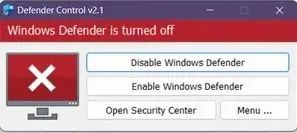
Defender Control

3

Uninstall: Faceit AC, Riot Vanguard, ACE (AntiCheatExpert).

4

If you have an NVidia video card, you will need the Nvidia GeForce Experience overlay enabled to run the software. You can download Nvidia GeForce Experience using this link. To enable the overlay, go to Settings - In-game overlay - Enable.

5

If you have an AMD video card, you need to install AMD Software: Adrenalin Edition (PRO does not work), enable the game overlay in the settings, and enable performance display in the Performance tab.

6

If you have an AMD video card, you will need Steelseries software to run and use Arcane PUBG ESP, Arcane PUBG Full and Arcane Delta Force, you can download it using this link. You will also need to register in this program. Then go to Settings - General - Enable Sonar. Next, go to Settings - Sonar - Shortcuts - Master. Bind the F7 key to "Volume - Up". You need to press this button before pressing LOAD in the loader and before injecting.

7

For games [Arcane Private Arc Raiders, Arcane Active Matter, Arcane Arma Reforger, Arcane WARDOGS, ROB RUN] a Medal or Discord overlay is required (the cheat will not work correctly without it):

Option 1 — Medal: - Download from medal.tv - Install and launch Medal - Log in - The overlay is ready — to check it press the F8 hotkey

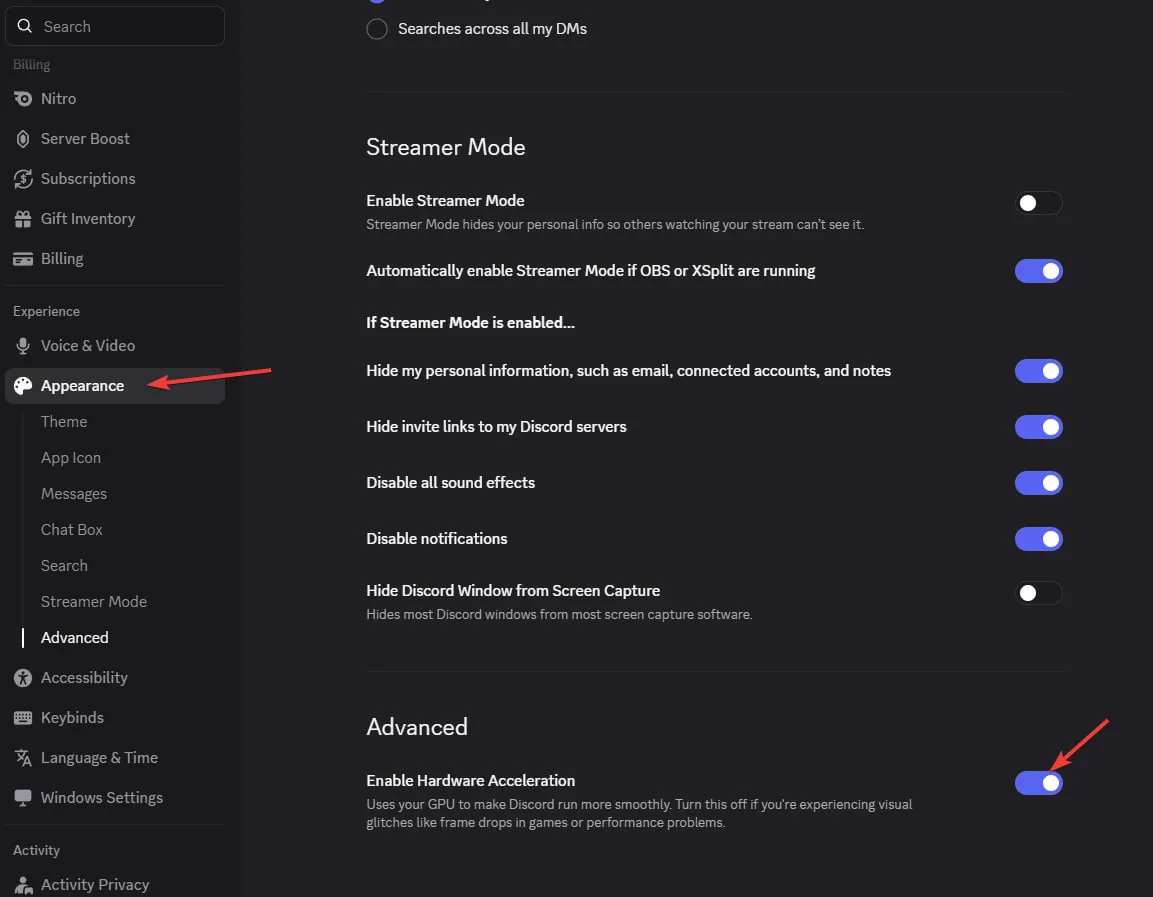
Option 2 — Discord: - Download from discord.com/download - Install and launch Discord - Go to User Settings → "Game Overlay" - Enable "Enable in-game overlay" - Disable "Legacy overlay" (if present) - Enable Hardware Acceleration discord - Important: If you see "No available overlays" — turn the overlay OFF and ON again
8

For the other games — set up an Nvidia or AMD overlay as described below.

9

Enter the game without the cheat and set the screen mode to "Borderless" or "Windowed", the software will not work in "Full Screen".
2

Step 2: Loader Installation & Key Activation

1

Download the loader from the "Frequently Asked Questions" section above by clicking the "Download loader" button.

2

Run the loader as administrator.

3

If necessary, wait for the loader to update and run it again.

4

Enter your key and press Enter in the loader window. To paste the copied key into the loader window, right-click on the window.

5

After a short load, authorization will occur, and you will see the main tab. Select your software, check the subscription expiration date and status.

6

For supported games, you will be prompted to clear traces of previous bans. Click "Yes" if you need to.

7

For supported games, you will be prompted to use a spoofer. Click "Yes" if you need to.

8

The loader will automatically close after successful loading.

9

Start your game. Injection will occur automatically.

3

Step 3: How to Open/Close the Cheat Menu

1

In Marvel Rivals, Dayz, PUBG ESP, Farlight, Dark and Darker, Delta Force, Apex and SQUAD, the cheat menu is opened/closed by pressing the "Home" or "Insert" keys.

2

In PUBG, the cheat menu is opened/closed by pressing the "Insert" key, but it can only be seen in a match. The cheat menu will not be visible in the main menu of the game/in the lobby.

3

To completely unload (disable) the software, use the "END" key. It is recommended to press it before exiting the game.

4

Step 4: FAQ for Common Issues

What to do if the cheat shows a WdFilter error?

Windows Defender / Antivirus is enabled → fully disable it (see Step 1).

What to do if the overlay does not work for Arcane Private Arc Raiders, Active Matter, Arma Reforger or WARDOGS?

Make sure the Medal or Discord overlay is installed and running, and that you are logged in. Check it with the F8 hotkey (Medal) or via the "Game Overlay" in Discord. If you see "No available overlays" — turn the overlay OFF and ON again.

How to update the libraries and drivers?

Update the Visual C++ libraries → Download and DirectX → Download.

What to do if the cheat conflicts with anticheats?

Remove FaceIt / Riot Vanguard anticheats.

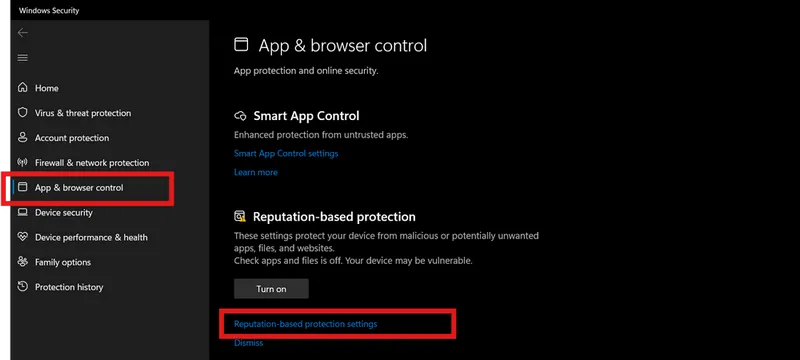
How to turn off Reputation-based Protection in Windows if it stops the cheat from launching?
  1. Start → type Reputation-based Protection.

turn off reputation base protection

  1. Disable all options.
Why does the cheat fail with a wrong system time and how to fix it?

Sync system time (Windows Settings → Time & Language → Sync).

Why is the ESP displayed incorrectly and how to fix it?

Set Windows scaling to 100% and the same resolution as in-game.

What to do if the loader does not work?

Try running it with a VPN.

Which Windows security features must be disabled for the cheat to work?

Disable Core Isolation and Secure Boot in BIOS.

What to do if the cheat does not inject or you have gameplay issues?

Switch the display mode to "Borderless" or "Windowed".

Is virtualization required for the Arcane cheat to work?

Yes, cheats require virtualization to be enabled.