Arcane GTA V(5) Online Enhanced
Status: Undetected
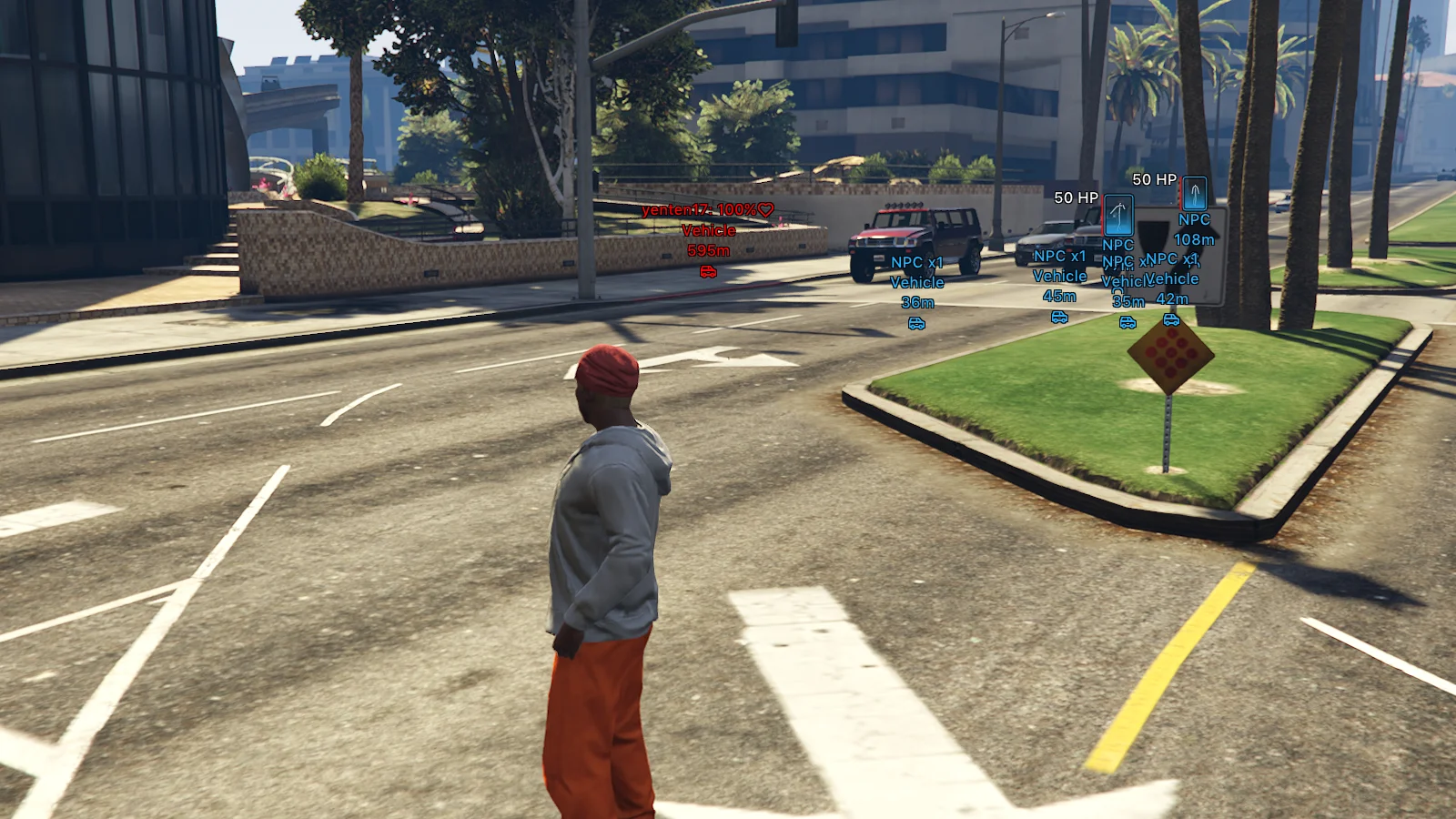
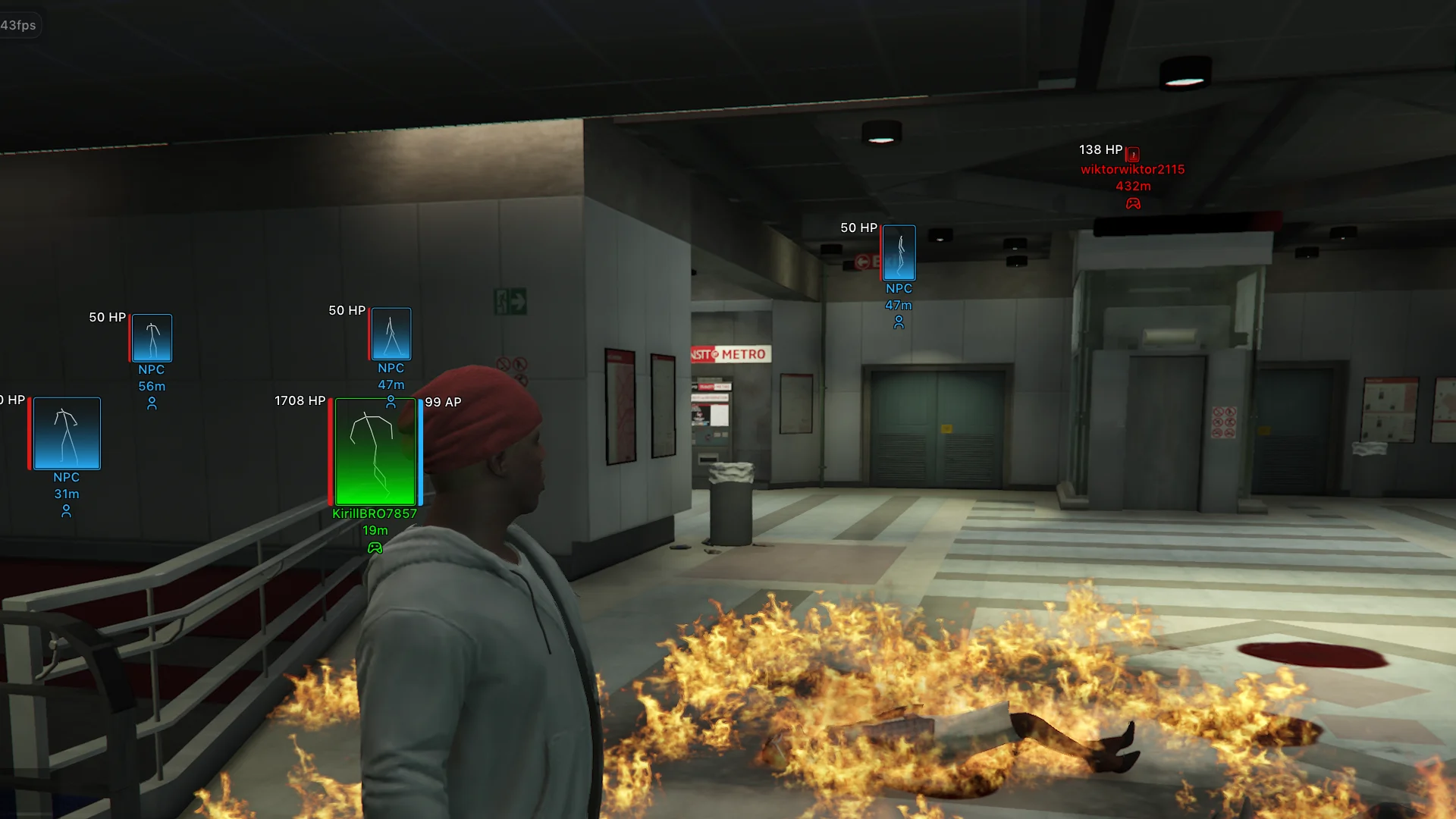
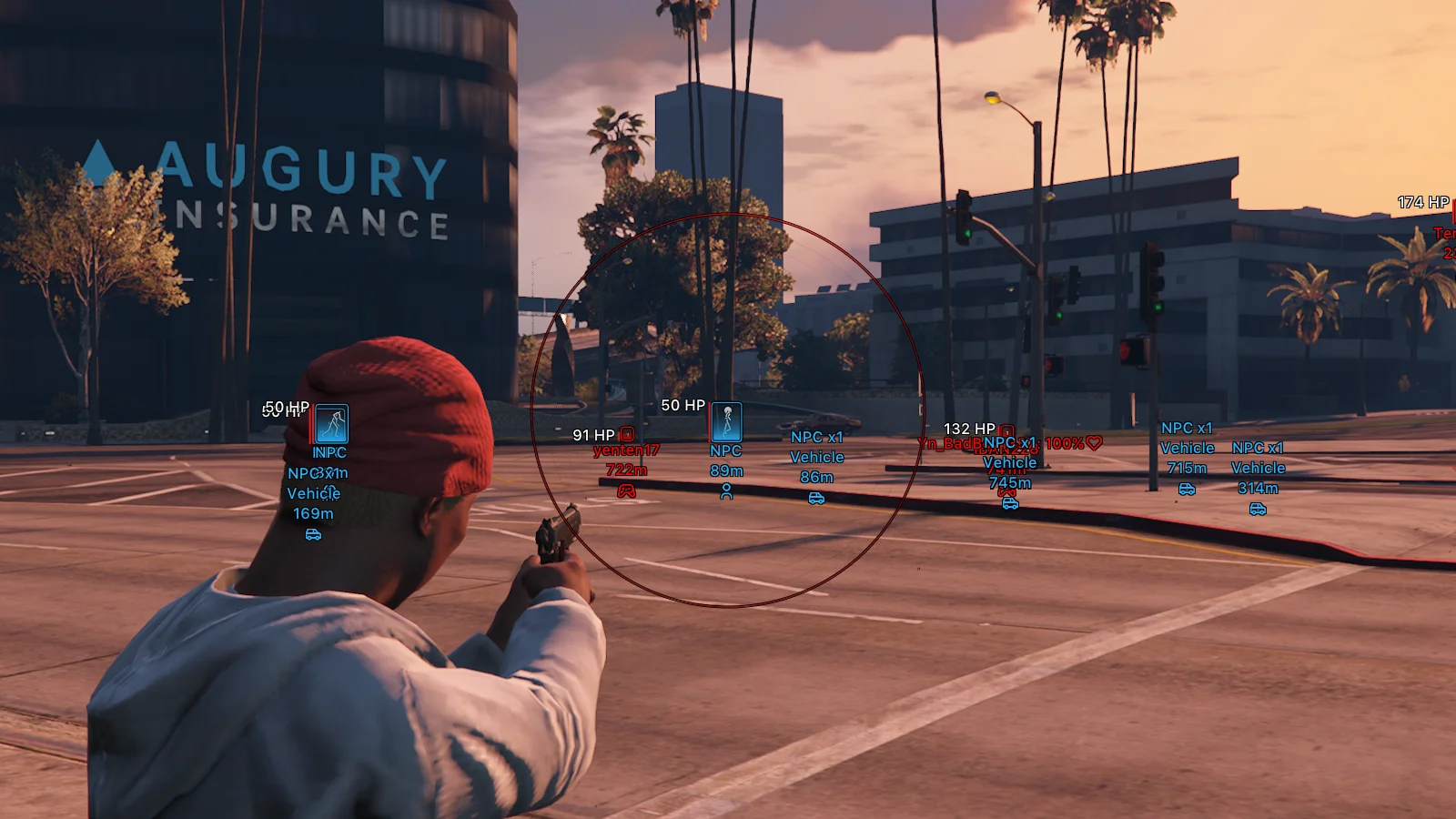
To zoom the image, double-click on it.
System Requirements:
Operating system: Windows 10, Windows 11 (21H2, 22H2, 23H2, 24H2, 25H2) Processor: Intel & AMD Video card: Nvidia & AMD Client: Steam, Xbox (Microsoft Store), Social Club (Rockstar), GTA Online
Section under development
Installation Guide
Follow the detailed instructions to activate Arcane GTA V(5) Online Enhanced cheat
Open GuideSelect Tariff
Secure payment. Instant access.
Main Features of Arcane GTA V(5) Online Enhanced
Aim Bot (Aimbot)
-
Enabled
Enables the aimbot for automatic aiming at selected targets -
Mode
Aimbot operating mode (hold key, always active) -
Aim Key
Selects the aimbot activation key -
Prediction
Accounts for the target’s movement speed and direction for more accurate aiming -
Player Lock
Locks onto a selected target until it is lost or eliminated -
Target NPCs
Allows the aimbot to work on npcs -
Target Friends
Allows aiming at players added to the friends list -
Aim With Melee
Enables aimbot when using melee weapons -
Aim With Throwable
Enables aimbot when using throwable weapons -
FOV Circle
Displays the aimbot working area circle -
FOV Thickness
Adjusts the outline thickness of the fov circle -
FOV Radius
Changes the radius in which the aimbot searches for targets -
Hide Aim FOV On Disabled Weapon Slots
Hides the fov circle for weapon categories (melee, throwable) -
Target Selection
Selects the aiming point mode (closest to crosshair, random, head, neck, chest, stomach) -
Smooth Factor
Adjusts the smoothness of the aim movement toward the target -
Max Distance
Maximum distance at which the aimbot will lock onto targets
ESP (WH)
-
Network Players
Displays real players -
NPC
Displays bots and peds -
Animals
Displays animals -
Enabled
Enables esp display of players/peds -
Draw Friends
Displays players from the friends list -
Name
Shows player information (nickname, distance, icon) -
Render Distance
Maximum distance at which player esp works -
Bounding Box
Displays the outline of the player model (boxes, corners only) -
Filled Box
Fills the inside of the box with color (gradient or solid fill) -
Health Bar
Displays a health bar next to the player model (solid color, value‑based, gradient) -
Armor Bar
Displays an armor bar next to the player model (solid color, value‑based, gradient) -
Bars Render Condition
Condition for showing health and armor bars (always, only if above zero) -
Skeleton
Displays the skeleton of the player model for more precise tracking of body parts even at distance
Entity ESP (Items and Vehicles)
-
Weapons
Displays weapons lying on the ground -
Ammo
Shows ammo boxes -
Money
Displays money drops (bags, packets, stacks, etc.) -
Health
Displays medkits and other health‑restoring items -
Misc
Displays various useful items and game objects -
Players Vehicles
Enables esp for vehicles owned by other players -
NPC
Displays vehicles driven by npcs -
Self Car
Enables display of the player's own vehicle -
Empty
Displays empty vehicles without a driver -
Render Distance
Maximum distance for displaying vehicles -
Render Mode
Determines how to show passengers in player/npc vehicles (hide, info only, show model, info and model) -
Info Mode
Selects how much information to show about passengers (brief, detailed) -
Info Condition
Sets the condition for displaying information (always, only if above zero) -
Vehicle Info
Displays additional information about the vehicle (name, distance, icon)
Character Settings
-
Never Wanted
Completely disables gaining wanted level -
Infinity Health
Makes health infinite -
Infinity Armor
Keeps armor at maximum -
Infinity Stamina
Disables stamina consumption when running, swimming, and other actions -
Infinity Vehicle Health
Makes the player's vehicle nearly invulnerable to damage -
Teleport Waypoint Key
Hotkey for instant teleportation to the selected map waypoint -
Instant Death Key
Hotkey for instantly killing the character -
No Spread
Completely removes bullet spread, significantly improving shooting accuracy -
No Recoil
Disables weapon recoil, keeping the crosshair on target after each shot -
Extended Damage
Increases weapon damage dealt
Vehicle Settings
-
Always Write
Automatically applies modified vehicle handling parameters (without the need to manually save settings) -
Mass
Allows changing the vehicle's mass (affecting its acceleration, stability, and collisions) -
Gravity
Changes the vehicle's gravity force -
Drive Force
Adjusts engine power and vehicle acceleration force -
Max Flat Velocity
Changes the maximum speed of the vehicle -
Initial Max Flat Velocity
Allows changing the base speed limit of the vehicle -
Drive Inertia
Adjusts acceleration inertia and throttle response -
Upshift
Changes the gear upshift speed -
Downshift
Changes the gear downshift speed -
Brake Force
Adjusts the effectiveness of the main braking system -
Handbrake Force
Changes the handbrake force -
Steering Lock
Allows changing the maximum wheel turn angle -
Traction Curve Max
Changes the maximum tire grip level -
Traction Curve Lateral
Adjusts lateral grip when cornering -
Traction Curve Min
Changes the minimum tire grip level -
Traction Curve Ratio
Allows adjusting the grip characteristic ratio -
Traction Spring Delta Max
Adjusts the maximum grip variation depending on suspension travel -
Traction Spring Delta Max Ratio
Changes the coefficient of suspension influence on grip -
Low Speed Traction Loss Mult
Adjusts traction loss at low speeds -
Traction Bias Front
Changes the grip distribution to the front axle -
Traction Bias Rear
Changes the grip distribution to the rear axle -
Traction Loss Mult
Adjusts the rate of traction loss during aggressive driving -
Downforce Multiplier
Changes the downforce level at high speeds -
Centre Of Mass X
Shifts the center of mass along the x axis (left/right) -
Centre Of Mass Y
Shifts the center of mass along the y axis (forward/backward) -
Centre Of Mass Z
Changes the center of mass height along the z axis -
Suspension Force
Adjusts suspension stiffness -
Suspension Compression Damp
Changes the suspension damping during compression -
Suspension Rebound Damp
Adjusts the suspension damping during rebound -
Suspension Upper Limit
Allows changing the maximum suspension travel height -
Suspension Lower Limit
Allows changing the minimum suspension travel height -
Suspension Raise
Changes the overall ride height -
Suspension Bias Front
Adjusts suspension characteristics distribution to the front axle -
Suspension Bias Rear
Adjusts suspension characteristics distribution to the rear axle -
Anti Rollbar Force
Changes the anti-roll bar stiffness -
Anti Rollbar Bias Front
Adjusts the anti-roll bar influence on the front axle -
Read From Vehicle
Reads the current handling parameters of the selected vehicle -
Write To Vehicle
Applies the changed handling parameters directly to the selected vehicle
Other Arcane GTAO Features
-
Languages
The menu supports multiple languages (english, russian, chinese) -
Crosshair
Enables a custom crosshair display (customizable) -
DPI Scale
Changes mod menu ui scale (100%, 125%, 150%) -
Theme
Two menu themes (light, dark) -
Show FPS
Displays real fps on screen -
Reduce Opacity When Hovered
Makes esp semi‑transparent when hovered (adjustable) -
Menu Key
Assigns the key to open and close the mod menu -
Unload Key
Assigns the key to completely unload the cheat from the game -
Battle Mode Key
Assigns a hotkey for quick combat mode toggle (customizable) -
Hide Animals
Hides animals in battle mode -
Hide Vehicles
Hides vehicles in battle mode -
Hide NPCs
Hides npcs in battle mode -
Hide Pickups
Hides all pickup items (weapons, ammo, money, and other items) -
Configs System
A full profile system with your saved settings for different playstyles and tasks (create, load, save, rename, share, delete)
Safety and Reliability of Arcane GTA V(5) Online Enhanced
Private cheat Arcane GTA V(5) Online Enhanced is developed with modern anti-cheat systems in mind and is regularly updated to maintain "Undetected" status. All purchase data is stored encrypted and is available only to you and our support service.
2-Minute Purchase Process:
- Choose payment method (FunPay or direct)
- Pay for selected tariff
- Receive access email within 2 minutes
- Follow instructions for activation
Reviews from our FunPay customers for 2026
There are no reviews for this product yet.