Installation Guide

Step-by-step guide for downloading, configuring and activating Ghost

Download loader

Pass the captcha to get the product loader

1

Step 1: Preparation

After payment, you will receive: - a key to activate access to the cheat, - a link to this manual.

Prepare your PC:

1

Completely disable Windows Defender (real-time protection). Remove other antivirus programs if installed.

2

We recommend disabling Windows Defender using Defender Control, download here (password: sordum). It should be red, with a red cross.
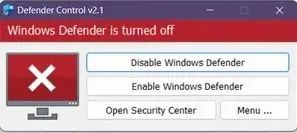
Defender Control

3

Uninstall: Faceit AC, Riot Vanguard, ACE (AntiCheatExpert).

4

Enter the game without the cheat and set the screen mode to "Borderless" or "Windowed", the software will not work in "Full Screen".
2

Step 2: Loader Installation & Key Activation

Step-by-step description of the software launch process:

1

After successful payment you will receive a key to activate access to the cheat and a link to this page.

2

Download the loader from the "Frequently Asked Questions" section above by clicking the "Download loader" button.

3

Make sure that the game is not running before launching the loader, otherwise there is a risk of blocking! Also, if you have already launched the game in this PC session, you need to restart it.

4

Now you need to launch the downloaded loader as administrator.

5

Insert the key you received upon purchase into the loader. (After the first activation of the key, the loader may close, you will have to start it again.)

6

After a while, a console window (CMD) will appear in front of you, and after a short loading, a message will appear that you need to start the game.

7

Start the game and wait until the main menu is fully loaded.

8

The cheat has been successfully launched. The menu is called by the Insert key. (The Chams version has no menu, just go into the raid)

If you want to launch the cheat together with some spoofer, always first launch the cheat loader, and only then the spoofer. Otherwise, your key will break.

3

Step 3: FAQ for Common Issues

What to do if the cheat shows a WdFilter error?

Windows Defender / Antivirus is enabled → fully disable it (see Step 1).

How to update the libraries and drivers?

Update the Visual C++ libraries → Download and DirectX → Download.

What to do if the cheat conflicts with anticheats?

Remove FaceIt / Riot Vanguard anticheats.

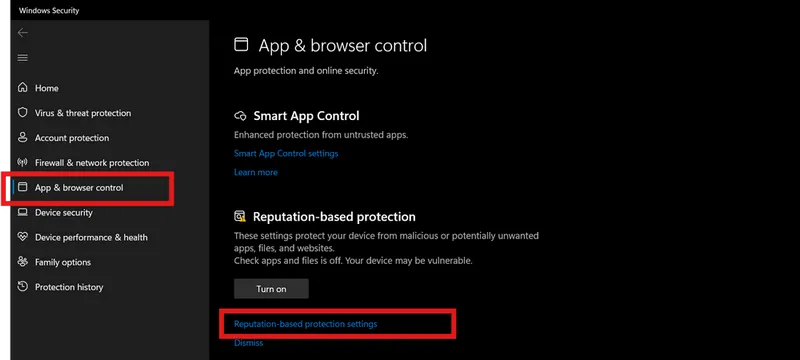
How to turn off Reputation-based Protection in Windows if it stops the cheat from launching?
  1. Start → type Reputation-based Protection.

turn off reputation base protection

  1. Disable all options.
Why does the cheat fail with a wrong system time and how to fix it?

Sync system time (Windows Settings → Time & Language → Sync).

Why is the ESP displayed incorrectly and how to fix it?

Set Windows scaling to 100% and the same resolution as in-game.

What to do if the loader does not work?

Try running it with a VPN.

Which Windows security features must be disabled for the cheat to work?

Disable Core Isolation and all other points in the same window, as well as Secure Boot in BIOS.

What to do if the cheat does not inject or you have gameplay issues?

Switch the display mode to "Borderless" or "Windowed".

Video guide

Step-by-step video guide