Pussycat Albion Online
Status: Undetected
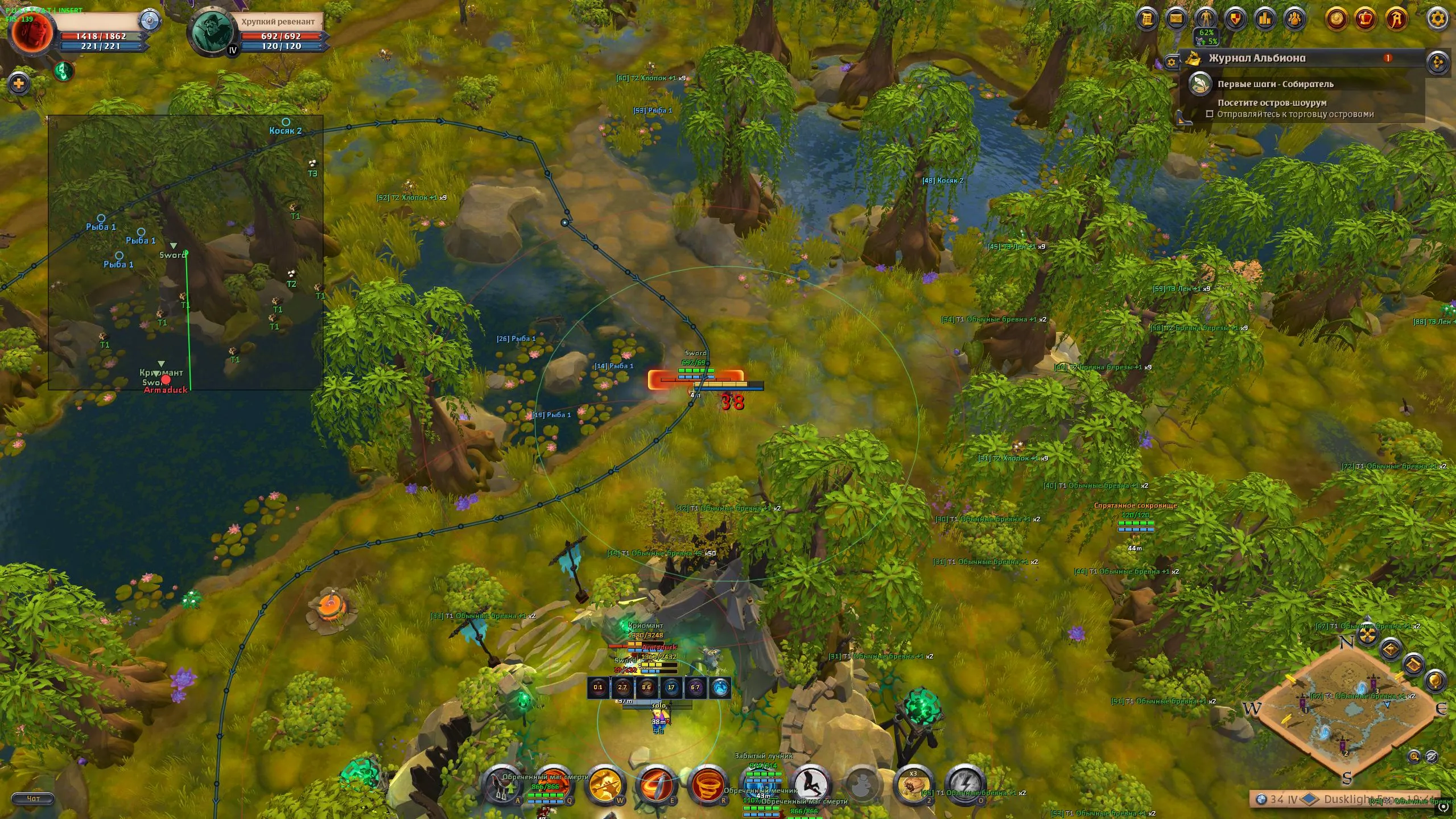
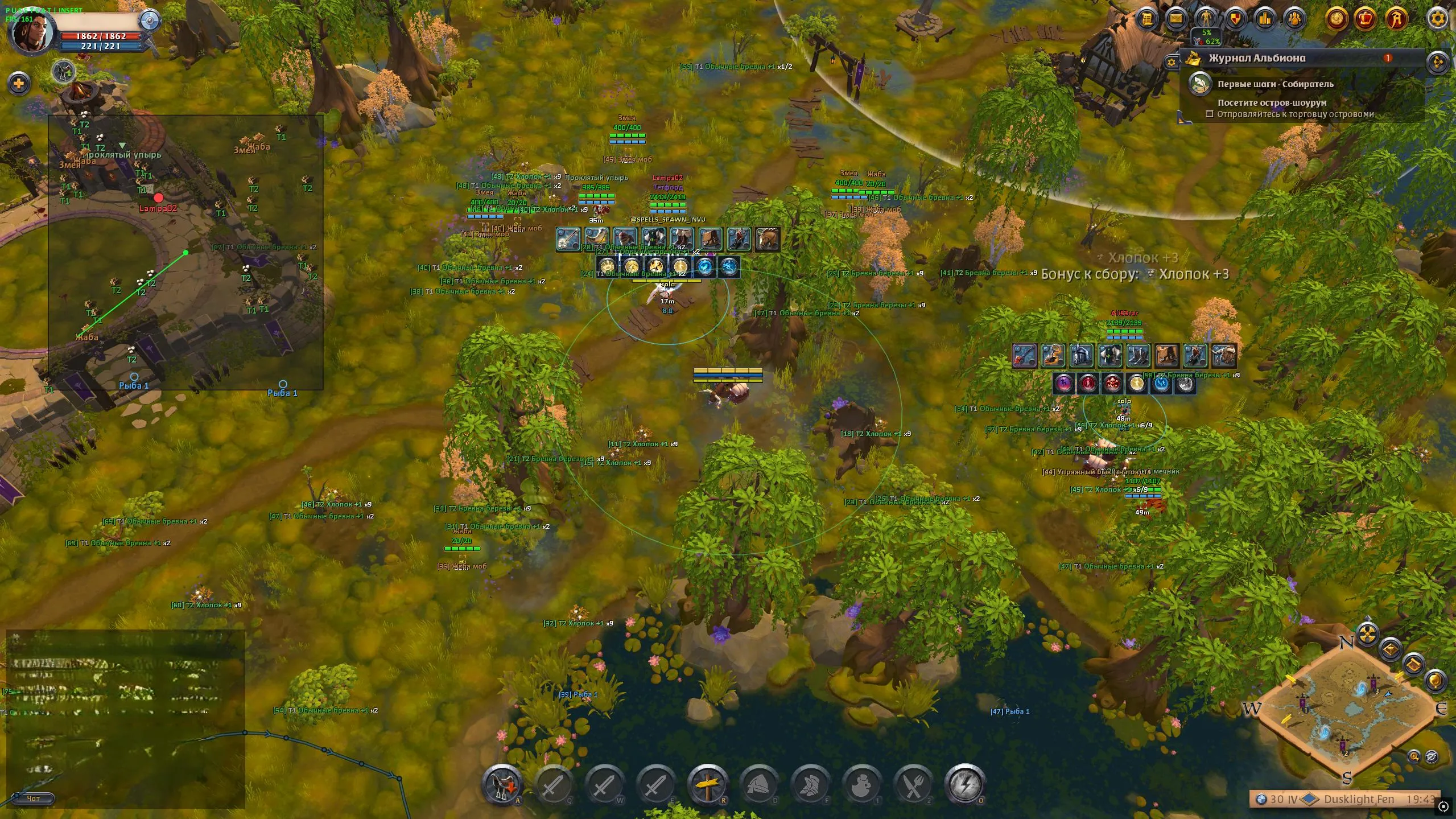
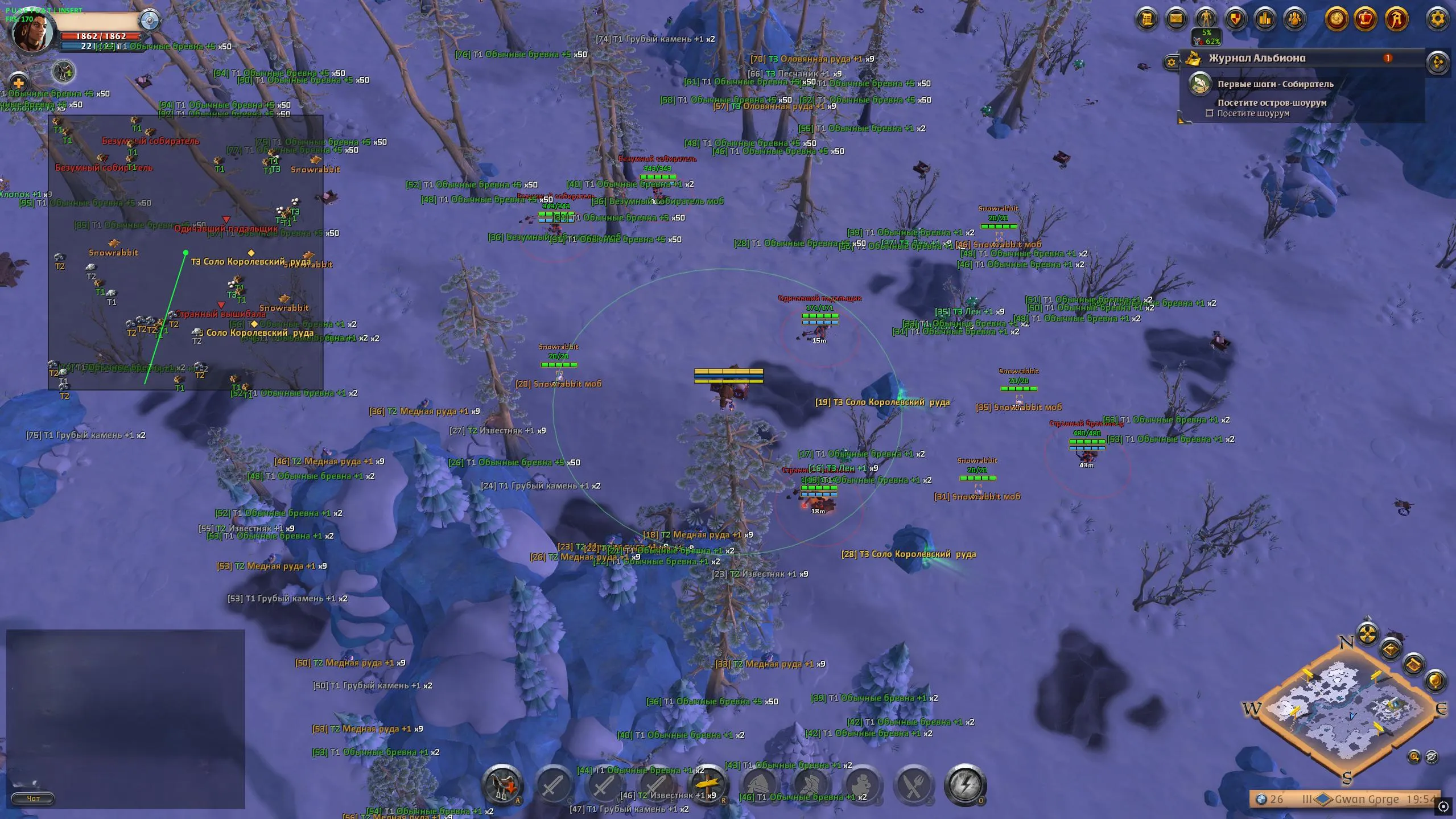
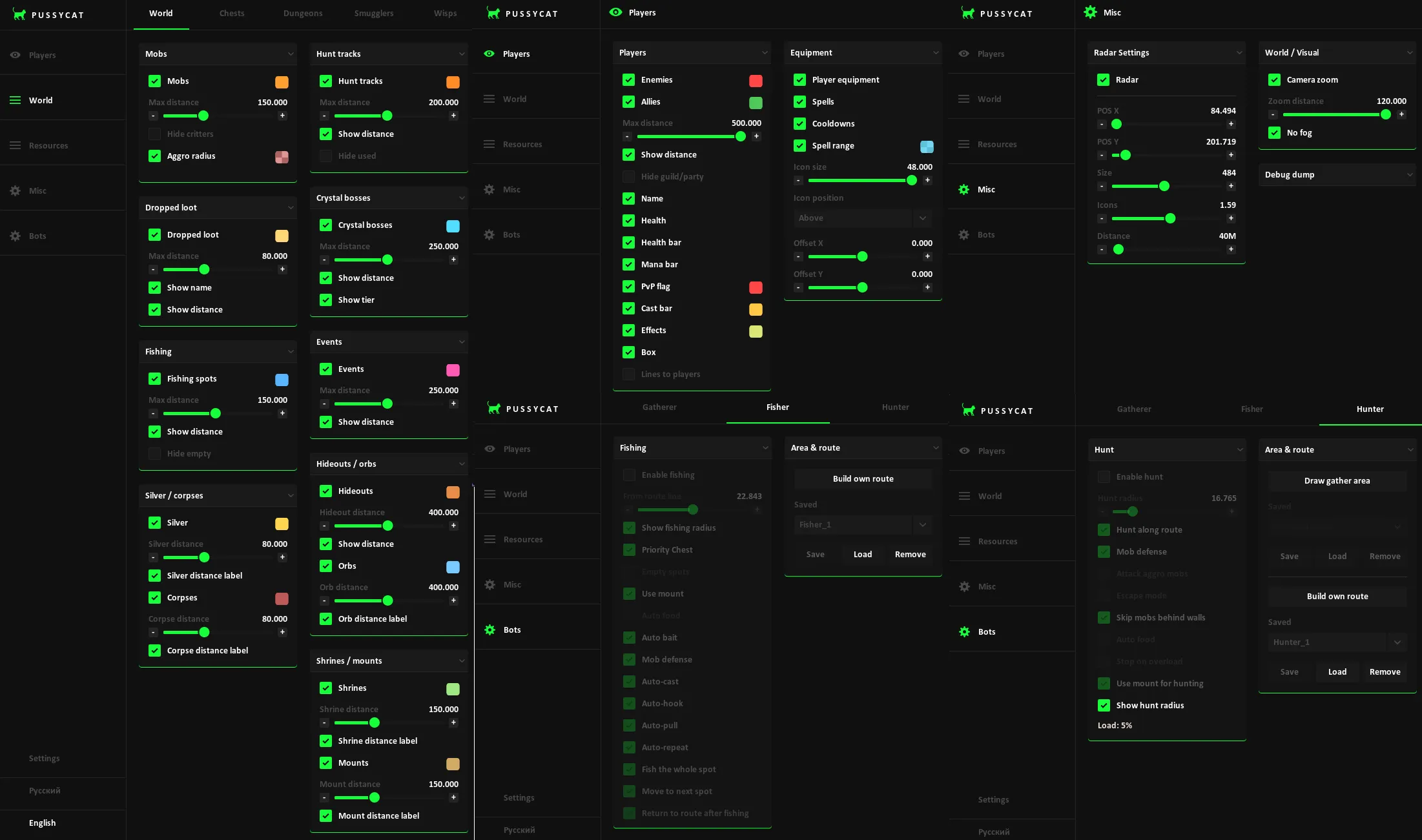
To zoom the image, double-click on it.
System Requirements:
Operating system: Windows 10, Windows 11 (21H2, 22H2, 23H2, 24H2, 25H2) Processor: Intel & AMD Video card: Nvidia & AMD Client: Albion Online (PC), Steam
Section under development
Installation Guide
Follow the detailed instructions to activate Pussycat Albion Online cheat
Open GuideSelect Tariff
Secure payment. Instant access.
Main Features of Pussycat Albion Online
Players
-
Enemies
Displays enemy players -
Allies
Displays allied players -
Max Distance
Maximum player render distance -
Show Distance
Shows the distance to the player -
Hide Guild/Party
Hides players from your guild or party -
Name
Displays the player's name/nickname -
Health
Shows the player's health -
Health Bar
Displays the health bar -
Mana Bar
Displays the mana bar -
PvP Flag
Shows the player's pvp status -
Cast Bar
Displays the ability cast progress -
Effects
Shows the player's active effects -
Box
Displays a box around the player -
Snaplines
Draws lines to players -
Line Origin
Selects the line starting point (bottom/top of the screen, from the crosshair)
Equipment
-
Player Equipment
Displays the player's equipment -
Spells
Shows the player's abilities -
Cooldowns
Displays ability cooldowns -
Spell Range
Shows the ability cast range -
Icon Size
Adjusts icon size -
Icon Position
Selects icon position -
Above
Places icons above the player -
Below Bars
Places icons below the bars -
Below Box
Places icons below the box -
Offset X
Adjusts horizontal offset -
Offset Y
Adjusts vertical offset
World ESP (Environment)
-
Mobs
Displays creatures on the map -
Hide Critters
Hides small creatures -
Aggro Radius
Shows creature aggro radius -
Dropped Loot
Displays dropped items -
Items Name
Shows the item name -
Item Distance
Shows the distance to the item -
Fishing Spots
Displays fishing spots -
Fishing Max Distance
Maximum render distance for fishing spots -
Fishing Distance
Shows the distance to the fishing spot -
Fishing Hide Empty
Hides empty fishing spots -
Silver
Displays silver on the ground -
Silver Distance
Silver render distance -
Silver Distance Label
Shows the distance to silver -
Corpses
Displays corpses -
Corpse Distance
Maximum corpse render distance -
Corpse Distance Label
Shows the distance to corpses -
Hunt Tracks
Displays hunting tracks -
Hunt Max Distance
Render distance for hunting tracks -
Hunt Distance
Shows the distance to tracks -
Hunt Hide Used
Hides already used tracks -
Crystal Bosses
Displays crystal bosses -
Crystal Max Distance
Distance for rendering bosses -
Crystal Distance
Shows the distance to the boss -
Crystal Show Tier
Displays the boss tier -
Events
Displays events on the map -
Events Max Distance
Maximum distance for events -
Events Distance
Shows the distance to the event -
Hideouts
Displays hideouts -
Hideout Distance
Maximum hideout render distance -
Hideout Distance
Shows the distance to the hideout -
Orbs
Displays orbs -
Orb Distance
Adjusts orb render distance -
Orb Distance Label
Shows the distance to the orb -
Shrines
Displays shrines -
Shrine Distance
Maximum shrine render distance -
Shrine Distance Label
Shows the distance to the shrine -
Mounts
Displays mounts -
Mount Distance
Maximum mount render distance -
Mount Distance Label
Shows the distance to the mount
Chests
-
Loot Chests
Displays loot chests -
Chest Mobs
Displays chests in mob camps -
Name
Shows the chest name -
Distance
Shows the distance to the chest -
Rarity
Displays chest rarity -
Hide Empty
Hides empty chests -
Max Distance
Maximum render distance
Dungeons
-
Enable
Enables dungeon display -
Max Distance
Maximum render distance -
Show Distance
Shows the distance to the dungeon -
Random
Displays random dungeons -
Royal
Displays royal dungeons -
Randomized Holes
Displays randomized entrances -
Solo
Shows solo dungeons -
Veteran
Shows veteran dungeons -
Elite
Shows elite dungeons -
Hide Visited
Hides visited dungeons -
Corrupted
Displays corrupted dungeons -
Hellgates
Displays hellgates -
Mists
Displays mists
Smugglers
-
Smugglers
Displays smugglers -
Crates
Shows smuggler crates -
Cages
Shows smuggler cages -
Max Distance
Maximum render distance -
Crate Distance
Crate render distance -
Cage Distance
Cage render distance -
Hide Opened
Hides opened objects
Wisps
-
Wisps
Displays wisps on the map -
Max Distance
Maximum render distance -
Show Distance
Shows the distance to wisps -
Filter
Filters wisps by group type -
All
Displays all wisps -
Solo
Displays solo wisps -
Duo
Displays duo wisps -
Group
Displays group wisps
Resources
-
Wood
Shows the location of trees -
Stone
Shows the location of rocks -
Fiber
Shows the location of fiber -
Ore
Shows the location of ore -
Hide
Shows the location of corpses and creatures -
Nodes + Mobs
Displays resource nodes and mobs -
Min Tier
Minimum resource tier to display -
Max Tier
Maximum resource tier to display -
Min Enchant
Minimum resource enchantment -
Max Enchant
Maximum resource enchantment -
Tier + Enchant on Label
Shows the resource tier and enchantment -
Max Distance
Maximum resource render distance (separately for each group) -
Show Distance
Shows the distance to the resource or object (separately for each group) -
Show Charges
Displays the number of resource charges (separately for each group) -
Hide Depleted
Hides fully gathered resources (separately for each group) -
Show Nearby Entities
Displays creatures, corpses, and other related objects near gathering spots
Radar Hack
-
Radar
Enables/disables radar display -
POS X
Adjusts the radar's horizontal position -
POS Y
Adjusts the radar's vertical position -
Size
Changes the radar size -
Icons
Displays object icons on the radar -
Distance
Distance to objects
Resource Bot
-
Enable Auto Gather
Enables automatic resource gathering -
Gather Radius
Adjusts the gathering radius -
Filter Resources via ESP
Uses esp to filter resources -
Skip Resources Behind Walls
Skips resources behind walls -
Mob Defense
Enables defense against creatures -
Skip Dangerous Mobs
Avoids dangerous creatures -
Min Mob Avoid
Sets the minimum distance from creatures -
Return to Route
Returns to the route after gathering -
Block Stuck Resource
Blocks stuck resources -
Stuck Timeout
Sets the wait time when stuck -
Auto Food
Automatically uses food -
Stop on Overload
Stops gathering when overloaded -
Stop from Load %
Stops gathering at the specified load -
Use Mount for Gathering
Uses a mount while gathering -
Show Gather Radius
Displays the gathering radius
Fishing Bot
-
Enable Fishing
Enables automatic fishing -
From Route Line
Uses the route line for movement -
Show Fishing Radius
Displays the fishing radius -
Priority Chest
Prioritizes chests -
Empty Spots
Takes empty fishing spots into account -
Use Mount
Uses a mount while moving -
Auto Food
Automatically uses food -
Auto Bait
Automatically uses bait -
Mob Defense
Enables defense against creatures -
Auto-Cast
Automatically casts the rod -
Auto-Hook
Automatically performs the hook set -
Auto-Pull
Automatically reels in the catch -
Auto-Repeat
Automatically repeats fishing -
Fish the Whole Spot
Fully fishes the selected spot -
Move to Next Spot
Moves to the next spot -
Return to Route After Fishing
Returns to the route after fishing
Hunting Bot
-
Enable Hunt
Enables automatic hunting -
Hunt Radius
Adjusts the hunting radius -
Hunt Along Route
Hunts along the route -
Mob Defense
Enables defense against creatures -
Attack Aggro Mobs
Attacks aggressive creatures -
Escape Mode
Enables retreat mode -
Run Below HP %
Retreats at low health -
Skip Mobs Behind Walls
The bot will skip creatures behind walls -
Auto Food
Automatically uses food -
Stop on Overload
Stops hunting when overloaded -
Stop from Load %
Stops hunting at the specified load -
Use Mount for Hunting
Uses a mount while hunting -
Show Hunt Radius
Displays the hunting radius
Other Pussycat Albion Features
-
Area & Route
Allows you to manage and build custom routes for resource gathering, fishing, or hunting (flexible configuration) -
Ability Keys
Allows you to assign up to 6 keys for different abilities -
Enemy Font Size
Adjusts enemy text size -
Item Font Size
Adjusts item text size -
Lock Overlay FPS
Locks the overlay fps -
Menu Key
Assigns the menu open key -
Save Config
Saves the current configuration -
Load Config
Loads a saved configuration -
Localization
The menu supports english and russian -
Camera Zoom
Changes the camera zoom level -
No Fog
Disables fog -
Debug ESP
Outputs diagnostic esp data for players, world objects, resources, and portals
Safety and Reliability of Pussycat Albion Online
Private cheat Pussycat Albion Online is developed with modern anti-cheat systems in mind and is regularly updated to maintain "Undetected" status. All purchase data is stored encrypted and is available only to you and our support service.
2-Minute Purchase Process:
- Choose payment method (FunPay or direct)
- Pay for selected tariff
- Receive access email within 2 minutes
- Follow instructions for activation
Reviews from our FunPay customers for 2026
There are no reviews for this product yet.