Byster Albion Hack
Status: Undetected
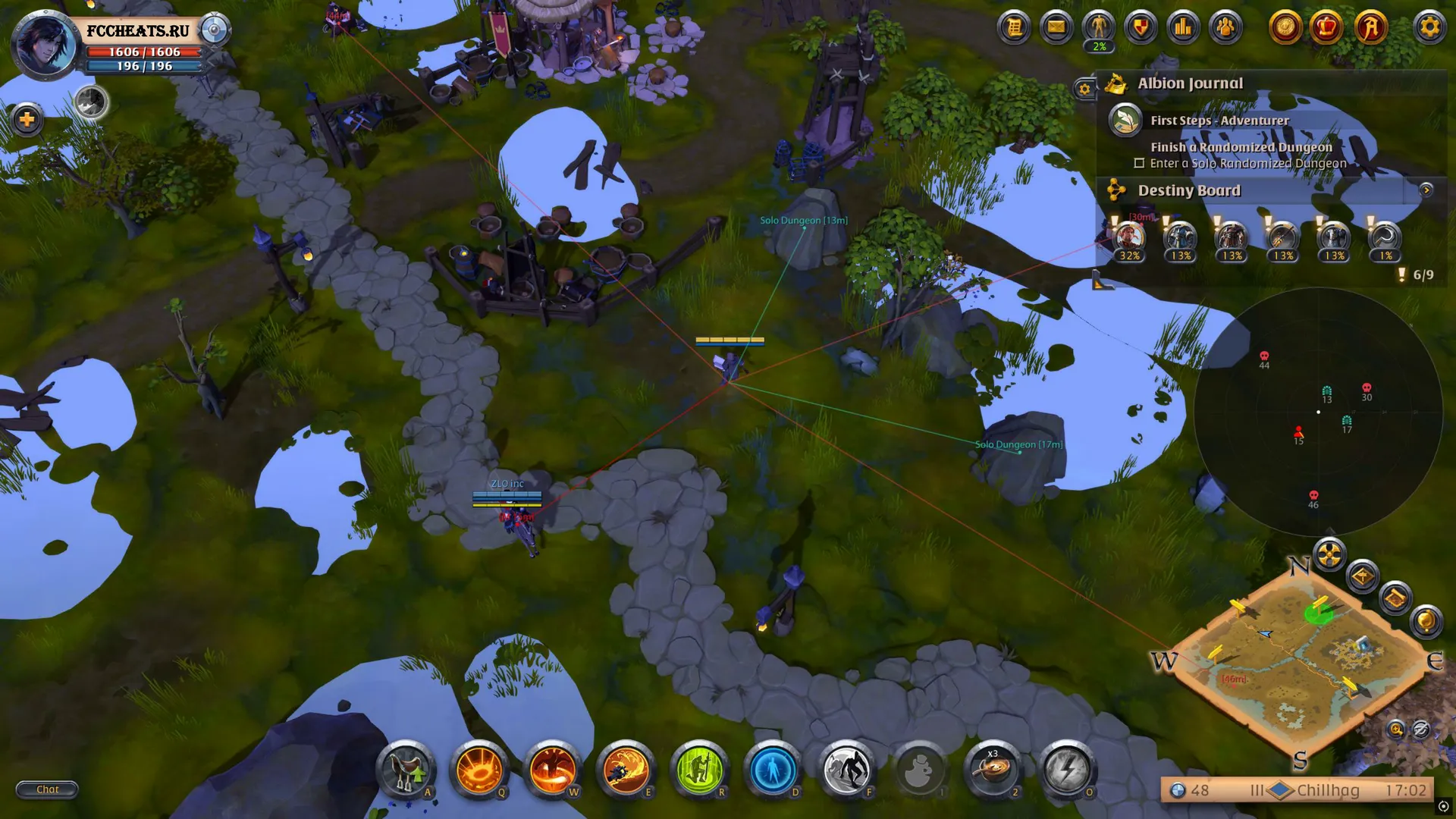
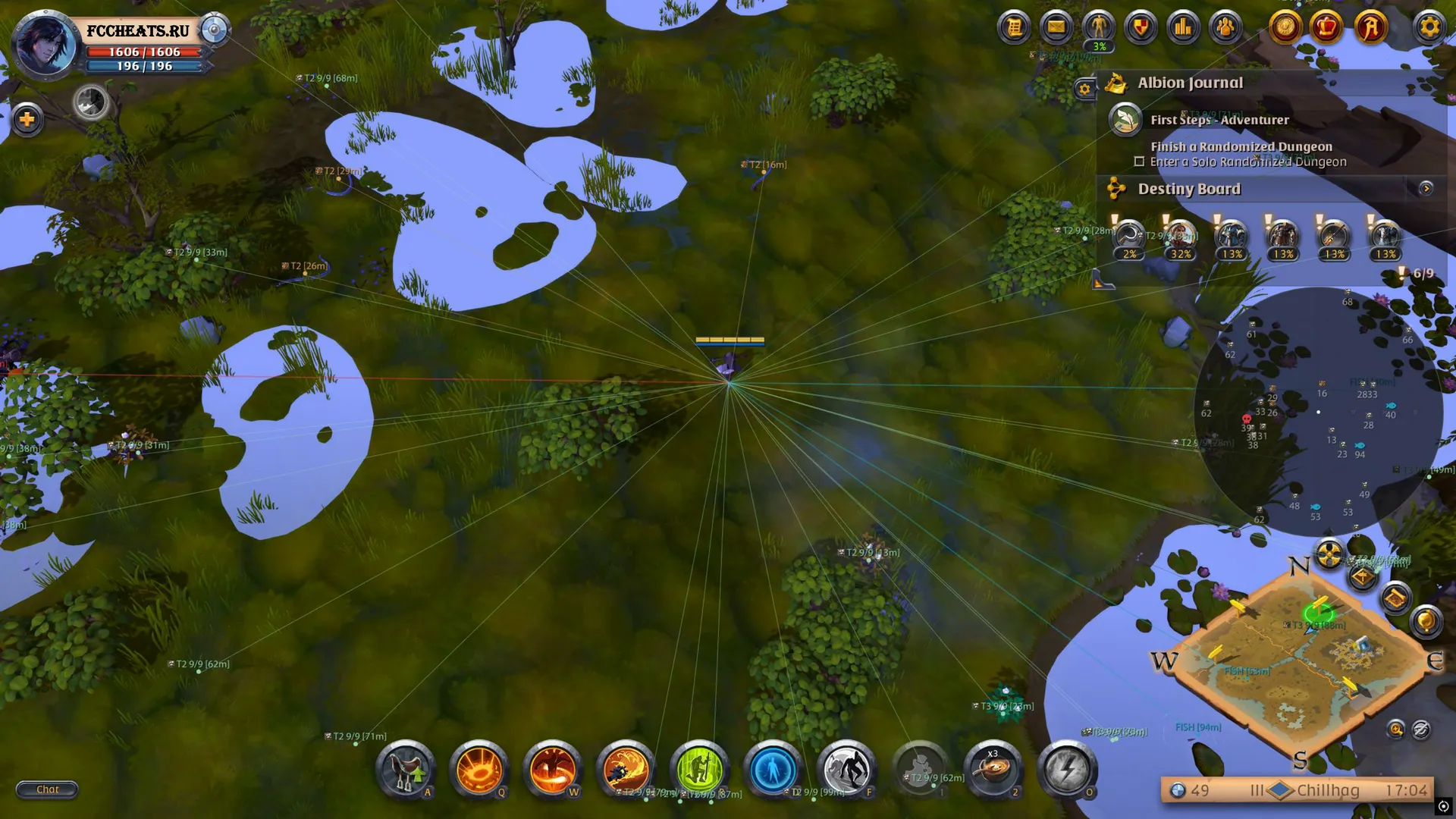
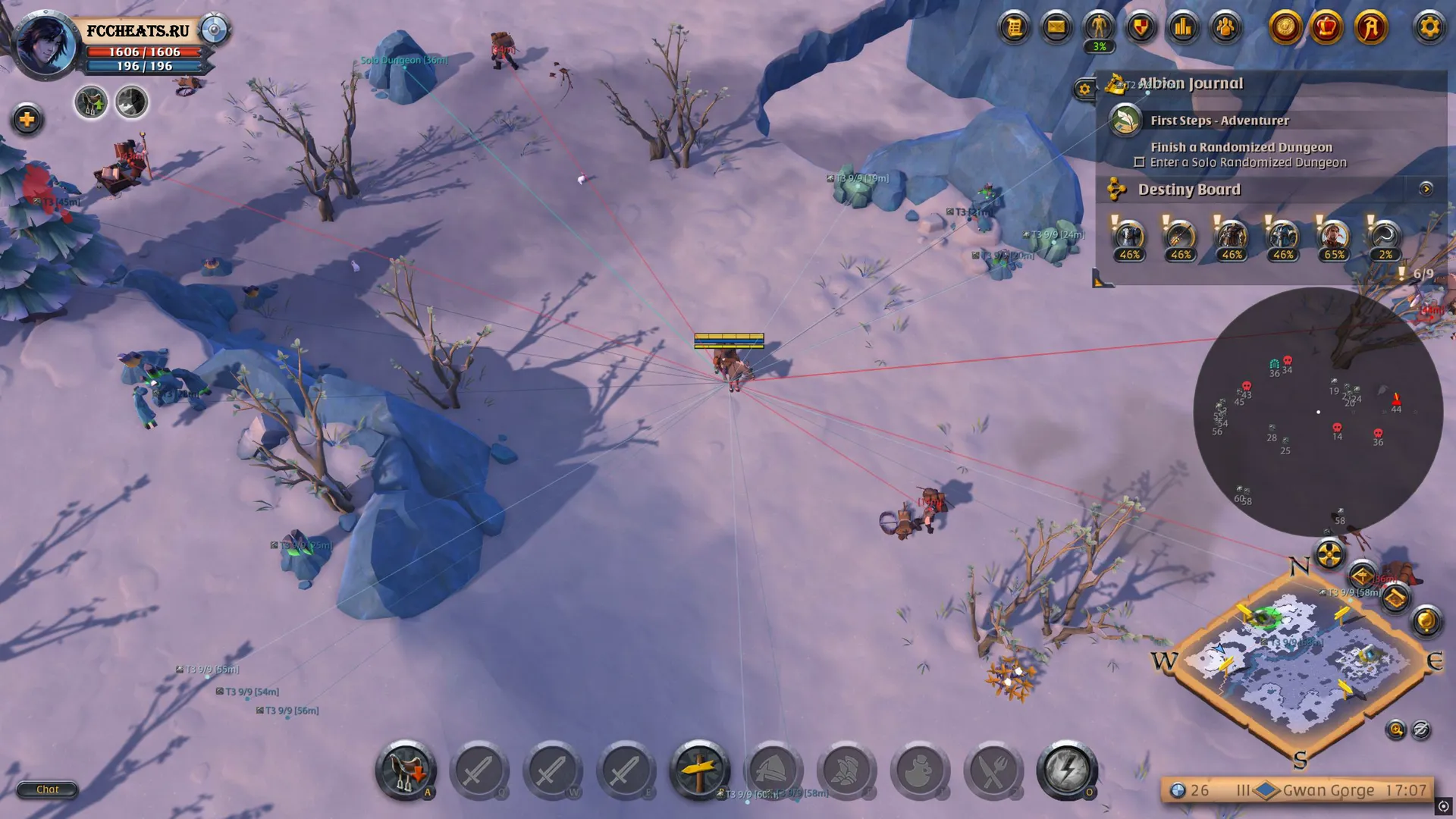
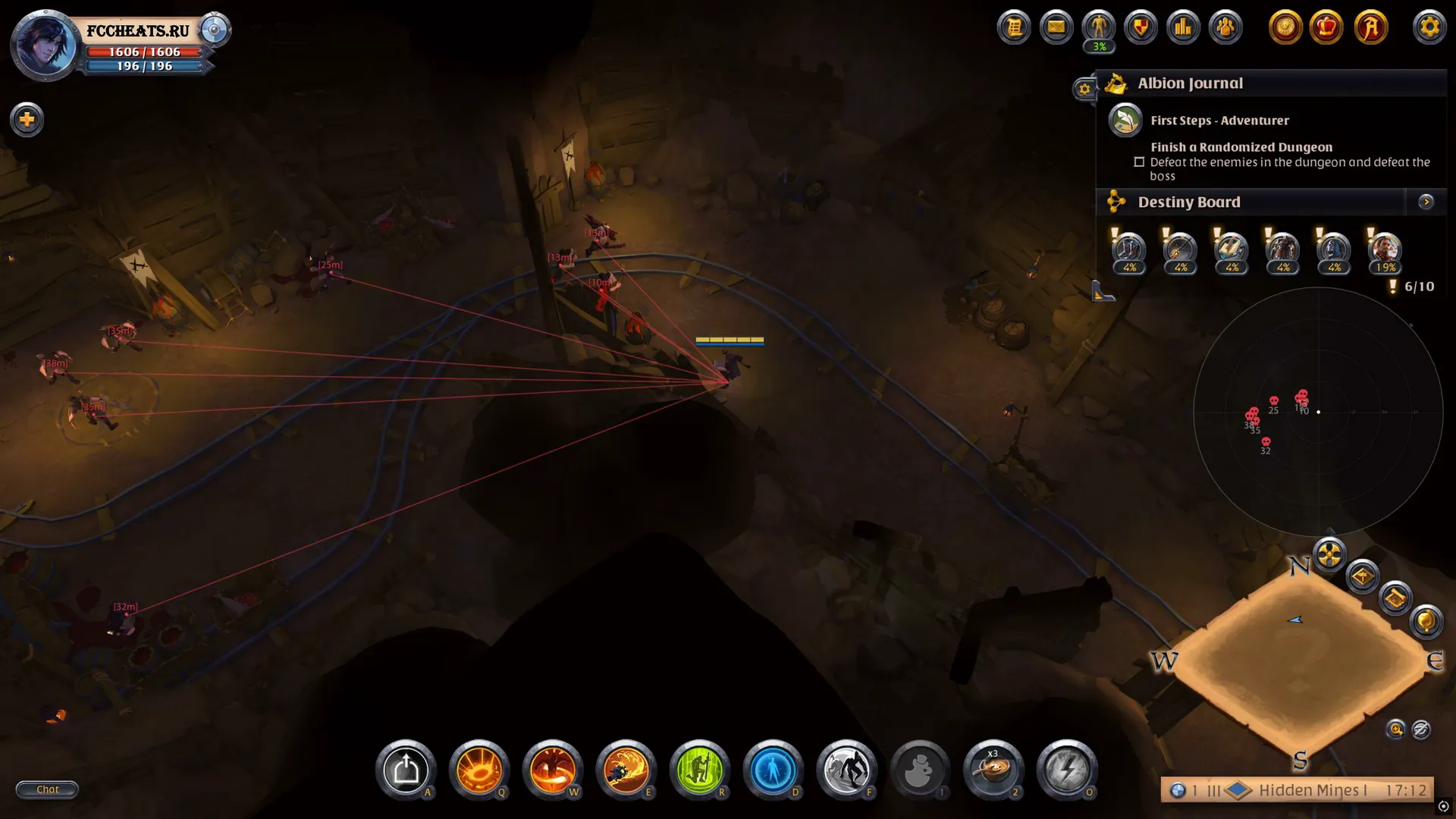
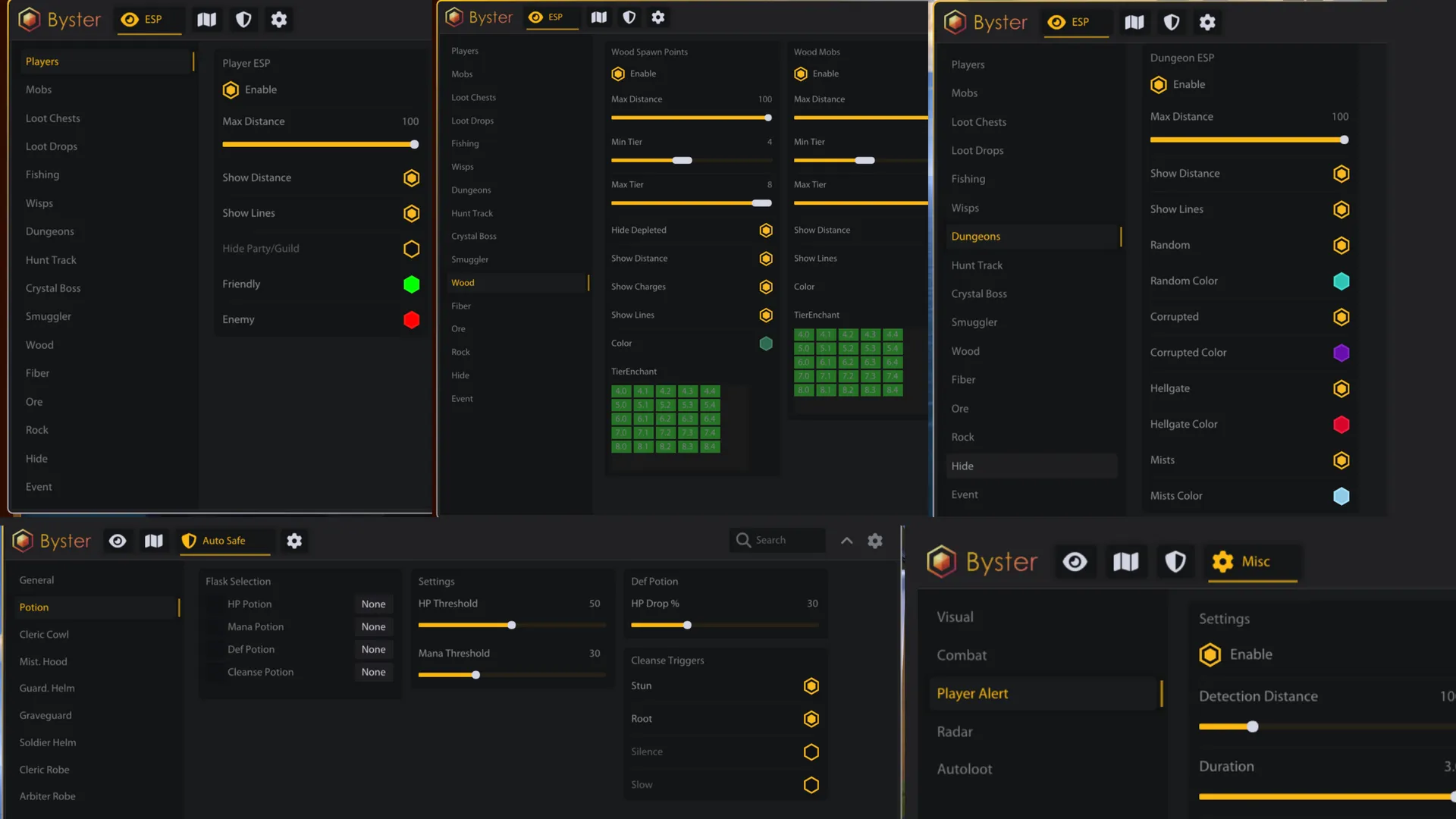
To zoom the image, double-click on it.
System Requirements:
Operating system: Windows 10, Windows 11 (21H2, 22H2, 23H2, 24H2, 25H2) Processor: Intel & AMD Video card: Nvidia & AMD Client: Albion Online (PC), Steam
Section under development
Select Tariff
Secure payment. Instant access.
Main Features of Byster Albion Hack
Visuals (Wallhack, ESP)
-
Players ESP
Enables player wallhack -
Mobs ESP
Enables mob display -
Loot ESP
Enables loot and chest display -
Fishing Zones ESP
Displays fishing zones -
Wisps ESP
Displays wisps with filtering by type (solo, duo, party) -
Dungeons ESP
Displays dungeons (random, corrupted, hellgate, mists) -
Hunt Tracks ESP
Displays hunting tracks -
Crystal Bosses ESP
Displays crystal bosses -
Smugglers ESP
Displays smugglers -
Smuggler Crates ESP
Displays smuggler crates -
Caged Smugglers ESP
Displays imprisoned smugglers -
Chest Mobs ESP
Displays chest mobs -
Event ESP
Displays game events -
Show Rarity
Shows rarity of loot and chests (uncommon, rare, epic, legendary) -
Hide Empty
Hides empty chests -
Hide Party/Guild
Hides party or guild members -
Show Tier
Displays tier level of objects or mobs -
Filter
Filters esp objects by type (e.g. wisps for solo, duo or party) -
Color Per Type
Separate color customization for different object types -
Name
Displays object names (players, loot, chests, etc.) -
Snaplines
Enables wh snaplines from screen to targets (configurable per group) -
Distance
Shows distance to players/objects/chests etc. in meters (configurable per group) -
Max Distance
Maximum display distance (configured separately for each category) -
Custom ESP Colors
Color settings for various esp elements -
Aggro Radius
Displays mob aggro radius as a circle on the ground
Resources ESP (Wood, Ores, etc)
-
Wood ESP
Displays wood (resource nodes + resource mobs) -
Fiber ESP
Displays fiber (resource nodes + resource mobs) -
Ore ESP
Displays ore (resource nodes + resource mobs) -
Rock ESP
Displays stone (resource nodes + resource mobs) -
Hide ESP
Displays hide (only resource mobs) -
Min Tier / Max Tier
Sets minimum and maximum resource tier (t1-t8) -
Tier + Enchant
Displays resource enchantment (e.g. 4.1, 5.2, 6.3) -
Enable
Enables display of selected resource type -
Max Distance
Maximum display distance for resources -
Distance
Shows distance to resources -
Show Charges
Shows remaining resource charges -
Show Lines
Draws wh lines from screen to resources (per category) -
Hide Depleted
Hides depleted (empty) resource nodes -
Color
Color settings for each resource type
Portals ESP & Ava Map
-
Portal ESP
Displays portals on the map and in the world -
Enable
Enables portal display -
Max Distance
Maximum portal display distance -
Show Distance
Shows distance to portals -
Show Slots
Shows number of available slots/entries in a portal -
Color
Portal display color settings -
Interactive Portal Map
Interactive portal map with visual placement display -
Portal List
Portal list sorted by distance to the player -
Zone Map with Markers
Zone map with markers for portals, chests, and key points -
Chest Count
Displays number of chests (large group chests, avalon chests) -
Dungeon Icons
Displays dungeon icons on the map -
Zone Name Search
Search zones by name -
Full Catalog
Full list of all zones (400+) -
Zone Table
Table with zone information (zone name, tier, chest count, resources)
Auto Safe (Scripts)
-
Enable
Enables the auto-safe system -
Toggle Hotkey
Hotkey to enable/disable auto-safe -
Priority
Ability usage priority (potions first, defensive abilities first) -
Flask Selection
Potion type selection by bind (healing, mana regen, defensive, cleanse) -
Flask HP Threshold
Hp threshold for potion use -
HP Drop %
Percentage of sudden hp drop for activation -
Mana Threshold
Mana threshold for potion use -
Cleanse Triggers
Cleanse trigger conditions (stun, root, silence, slow) -
Cleric Cowl
Automatic use of cleric cowl -
Cleric HP Threshold
Hp threshold for cleric cowl activation -
Activate on Stun
Auto-activate on stun -
Mist Caller Hood
Automatic use of mistcaller hood -
Mist Caller Hood HP Threshold
Hp threshold for mistcaller -
Guardian Helmet
Automatic use of guardian helmet -
Self DoT Detection
Helmet triggers on self-damage (dot) -
Ally Detection
Consider ally damage -
Ally HP Threshold
Health threshold for allies -
Graveguard Helmet
Automatic use of graveguard helmet -
Auto Target Selection
Automatic target selection -
Soldier Helmet
Automatic use of soldier helmet -
Cleric Robe
Automatic use of cleric robe -
Arbiter Robe
Automatic use of arbiter robe -
Min Allies Low HP
Minimum number of low hp allies (arbiter robe) -
Include Self
Include self in calculation (arbiter robe) -
Astral Q
Automatic use of q ability (quick assist, heal, buff) -
Ally HP Threshold
Ally hp threshold -
Astral Q Include Self
Include self for q ability -
Auto Target Selection
Auto-target selection -
Astral W
Automatic use of w ability (control) -
Min CC Allies
Minimum number of cc’d allies -
Astral W Include Self
Include self for w -
All Q + W Settings
Applies all q and w settings
Other Byster Albion Features
-
Zoom Hack
Increases maximum camera zoom-out distance -
Battle-Mode
Hides unnecessary esp and leaves only player display (toggleable) -
Auto Decline
Automatically declines party invites -
Disable Player Rendering
Disables player rendering in cities for higher fps -
Fog Removal
Automatically removes fog -
Player Alert
Enables player alert system -
Detection Distance
Player detection distance -
Alert Duration
Duration of alert notification -
Configs System
Full system for creating and managing profiles with settings (usable for different builds) -
Languages
Byster albion menu supports multiple languages (english, russian, chinese) -
ESP Customization
Color customization for each esp element -
Radar
Enable radar (maphack) -
Radar Range
Radar object range -
Radar Size
Radar window size -
Camera Relative
Radar rotates relative to the camera -
Lock Position
Locks radar position on screen -
Icon Scale
Radar icon size -
Auto-Loot
Enables auto-looting -
Show Grid
Displays loot grid for auto-loot -
Rows
Number of rows in loot window -
Auto-Loot Delay
Delay between item pickups
Safety and Reliability of Byster Albion Hack
Private cheat Byster Albion Hack is developed with modern anti-cheat systems in mind and is regularly updated to maintain "Undetected" status. All purchase data is stored encrypted and is available only to you and our support service.
2-Minute Purchase Process:
- Choose payment method (FunPay or direct)
- Pay for selected tariff
- Receive access email within 2 minutes
- Follow instructions for activation
Reviews from our FunPay customers for 2026
There are no reviews for this product yet.