Unnamed Delta Force FULL Guide - Complete Installation and Setup Tutorial
Detailed installation and setup guide for Unnamed Delta Force FULL on Delta Force: Hawk Ops
Back to Unnamed Delta Force FULL descriptionFrequently Asked Questions about Unnamed Delta Force FULL
❓ How to launch Unnamed Delta Force FULL?
Follow the guide below. The process usually includes downloading, installing and activating the cheat.
📥 How to download loader for Unnamed Delta Force FULL?
Click the button on the right, pass captcha — and you'll be redirected to the Telegram bot with the link.
⚡ System Requirements
Step-by-Step Installation Guide for Unnamed Delta Force FULL
Software Usage Guide
Step-by-step guide for downloading and launching our software:
Step 1: Preparation
After payment, you will receive:
- a key to activate access to the cheat,
- a link to this manual.
Prepare your PC:
-
Completely disable Windows Defender (real-time protection). Remove other antivirus programs if installed.
-
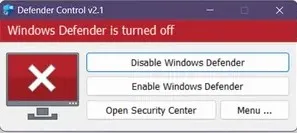
We recommend disabling Windows Defender using Defender Control, download here (password: sordum). It should be red, with a red cross.
-
Uninstall: Faceit AC, Riot Vanguard, ACE (AntiCheatExpert).
-
Enter the game without the cheat and set the screen mode to "Borderless" or "Windowed", the software will not work in "Full Screen".
Step 2: Loader Installation & Key Activation
Step-by-step description of the software launch process:
- After successful payment you will receive a key to activate access to the cheat, a link to this page.
- Download the loader from the "Frequently Asked Questions" section above by clicking the "Download loader" button.
- Make sure that the game is not running before launching the loader, otherwise there is a risk of blocking! And also, if you have already launched the game in this PC session, you need to reboot it.
- Now you need to launch the downloaded loader as administrator.
- Insert the key you received upon purchase into the loader. (After the first activation of the key, the loader may close, you will have to start it again.)
- When you run the cheat for Arena Breakout, it will ask you to specify the path to the game launcher file at this stage (UAGame.exe)
- After a short load, if everything is ok, the loader will ask you to run the game.
- Start the game and wait until the main menu is fully loaded.
- the cheat menu will appear in front of you. There is no menu in the Chams version. The cheat menu is opened/closed by pressing the Insert key. .
If you want to launch the cheat together with some spoofer, always first launch the cheat loader, and only then the spoofer. Otherwise, your key will break.
Step 3: FAQ for Common Issues
- Windows Defender / Antivirus enabled → fully disable.
- Update Visual C++ libraries → Download.
- Update DirectX → Download.
- Remove FaceIt / Riot Vanguard anticheats.
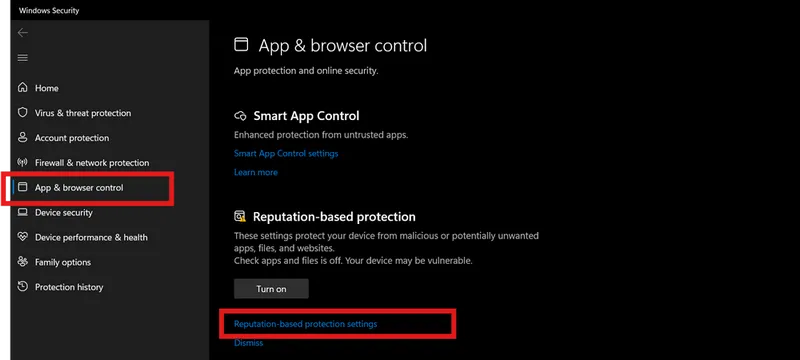
- Disable Reputation-based Protection:
- Start → type Reputation-based Protection.
-
Disable all options.
-
Sync system time (Windows Settings → Time & Language → Sync).
- ESP displays incorrectly → scaling 100% + same in-game resolution.
- Loader fails → try with VPN.
- Disable Core Isolation.
- Disable Secure Boot in BIOS.
- Injection/gameplay issues → switch screen mode (Borderless / Windowed).
📝 Additional Information
🔒 Security and Anonymity
Our product receives regular updates to ensure maximum security and compatibility with the latest game versions.
🆘 Technical Support
If you encounter any issues with installation or operation, contact our technical support.