Paladins Softhub Guide - Complete Installation and Setup Tutorial
Detailed installation and setup guide for Paladins Softhub on Paladins
Back to Paladins Softhub descriptionFrequently Asked Questions about Paladins Softhub
❓ How to launch Paladins Softhub?
Follow the guide below. The process usually includes downloading, installing and activating the cheat.
📥 How to download loader for Paladins Softhub?
Click the button on the right, pass captcha — and you'll be redirected to the Telegram bot with the link.
⚡ System Requirements
Step-by-Step Installation Guide for Paladins Softhub
Software Usage Guide
Step-by-step guide for downloading and launching our software:
Step 1: Preparation
After payment, you will receive:
- a key to activate access to the cheat,
- a link to this manual.
Prepare your PC:
-
Completely disable Windows Defender (real-time protection). Remove other antivirus programs if installed.
-
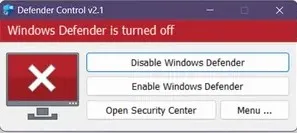
We recommend disabling Windows Defender using Defender Control, download here (password: sordum). It should be red, with a red cross.
-
Uninstall: Faceit AC, Riot Vanguard, ACE (AntiCheatExpert).
-
Enter the game without the cheat and set the screen mode to "Borderless" or "Windowed", the software will not work in "Full Screen".
Step 2: Loader Installation & Key Activation
Step-by-step description of the software launch process:
-
After paying for the goods, you will receive a product activation key (cheat).
-
Download the loader from the "Frequently Asked Questions" section above by clicking the "Download loader" button.
-
Now you need to disable the antivirus and place the loader on the USB flash drive. It only runs from a flash drive.
-
Run the cheat file. You need to create an account in the loader or log in to an existing SoftHub account.
-
After logging into your account, you can activate the key (Activate Key) and add yourself a subscription.
-
In order for the cheat to work in the game, make sure you have the "Full screen in the window" mode in the game settings.
-
Next, select the game on the left in the list and click "Load Cheat".
-
When we see the inscription "Done" in the window that appears, you can start the game.
-
After you have loaded in the main menu of the game, wait 15 seconds and press the F2 key. The menu open/close by F2.
If you want to launch the cheat together with some spoofer, always first launch the cheat loader, and only then the spoofer. Otherwise, your key will break.
Step 3: FAQ for Common Issues
-
Windows Defender / Antivirus enabled → fully disable.
-
Update Visual C++ libraries → Download.
-
Update DirectX → Download.
-
Remove FaceIt / Riot Vanguard anticheats.
-
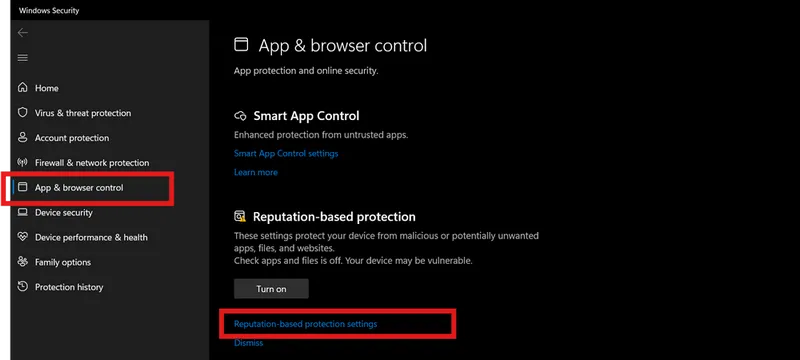
Disable Reputation-based Protection:
- Start → type Reputation-based Protection.
-
Disable all options.
-
Sync system time (Windows Settings → Time & Language → Sync).
-
ESP displays incorrectly → scaling 100% + same in-game resolution.
-
Loader fails → try with VPN.
-
Disable Core Isolation.
-
Disable Secure Boot in BIOS.
-
Injection/gameplay issues → switch screen mode (Borderless / Windowed).
📝 Additional Information
🔒 Security and Anonymity
Our product receives regular updates to ensure maximum security and compatibility with the latest game versions.
🆘 Technical Support
If you encounter any issues with installation or operation, contact our technical support.