Installation Guide

Step-by-step guide for downloading, configuring and activating Byster

Download loader

Pass the captcha to get the product loader

1

Step 1: Preparation

After payment, you will receive:

1

a key to activate access to the cheat,

2

a link to this manual.

Prepare your PC:

3

Completely disable Windows Defender (real-time protection). Remove other antivirus programs if installed.

4

We recommend disabling Windows Defender using Defender Control, download here (password: sordum). It should be red, with a red cross.
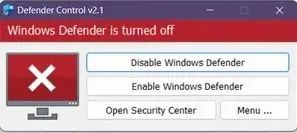
Defender Control

5

Uninstall: Faceit AC, Riot Vanguard, ACE (AntiCheatExpert).

6

Enter the game without the cheat and set the screen mode to "Borderless" or "Windowed", the software will not work in "Full Screen".
2

Step 2: Loader Installation & Key Activation

Step-by-step description of the software launch process:

1

Download the loader from the "Frequently Asked Questions" section above by clicking the "Download loader" button.

2

Run the loader. When running, you need to select a server, 2 options are available: China - for China, Global - for all other countries.

3

After selecting the server, the loader will create configs and close. Now you need to run it again.

4

You will see an authorization window in the loader. Register if you don't have an account yet.

5

After registration, you will be automatically logged into your account.

6

To activate the key, go to the settings (gear on the right top), enter your key in the line "Activate key" and press "Enter".

7

After activating the key, you need to restart the loader.

8

Now, when choosing a game, you will see the end date of your subscription.

9

Select the appropriate software and press "Download".

10

Wait for the console to appear and follow the further instructions for your game.

11

The Cheat Menu is opened/closed by pressing the Insert key

If you want to launch the cheat together with some spoofer, always first launch the cheat loader, and only then the spoofer. Otherwise, your key will break.

3

Step 3: FAQ for Common Issues

What to do if the cheat shows a WdFilter error?

Windows Defender / Antivirus is enabled → fully disable it (see Step 1).

How to update the libraries and drivers?

Update the Visual C++ libraries → Download and DirectX → Download.

What to do if the cheat conflicts with anticheats?

Remove FaceIt / Riot Vanguard anticheats.

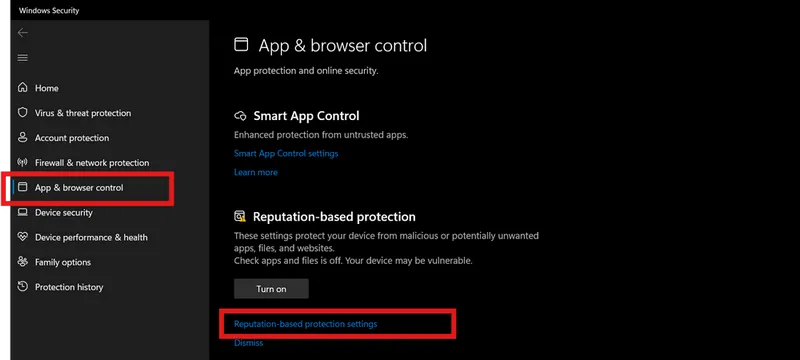
How to turn off Reputation-based Protection in Windows if it stops the cheat from launching?
  1. Start → type Reputation-based Protection.

turn off reputation base protection

  1. Disable all options.
Why does the cheat fail with a wrong system time and how to fix it?

Sync system time (Windows Settings → Time & Language → Sync).

Why is the ESP displayed incorrectly and how to fix it?

Set Windows scaling to 100% and the same resolution as in-game.

What to do if the loader does not work?

Try running it with a VPN.

Which Windows security features must be disabled for the cheat to work?

Disable Core Isolation and Secure Boot in BIOS.

What to do if the cheat does not inject or you have gameplay issues?

Switch the display mode to "Borderless" or "Windowed".

Is virtualization and Hyper-V required for the cheat to work?

Yes, cheats require virtualization and Hyper-V to be enabled.