Installation Guide

Step-by-step guide for downloading, configuring and activating Predator

Download loader

Pass the captcha to get the product loader

1

Step 1: Preparation

After payment, you will receive: - a key to activate access to the cheat, - a link to this manual.

Prepare your PC:

1

Completely disable Windows Defender (real-time protection). Remove other antivirus programs if installed.

2

We recommend disabling Windows Defender using Defender Control, download here (password: sordum). It should be red, with a red cross.
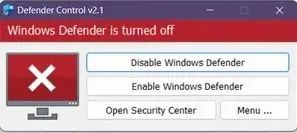
Defender Control

3

Make sure you have Secure Boot disabled.

4

Uninstall: Faceit AC, ACE (AntiCheatExpert).

5

Enter the game without the cheat and set the screen mode to "Windowed", the software will not work in "Full Screen".
2

Step 2: Loader Installation & Key Activation

1

First, you need to create an account in the Predator software. You will receive a registration link after payment, along with the key.

2

Before running the loader, make sure all games are closed. It is strongly recommended not to run the loader with other games open!

3

Run the previously downloaded loader as administrator.

4

You must log in to your Predator Systems account in the loader. Check the "Remember me" box to avoid having to re-enter your information next time.

5

After a short loading time, you will see the loader interface with a list of available applications and information about them.

6

Select the game you want and click "Load".

7

When the message "Waiting for the game..." appears, open your game.

8

After the game's main menu has fully loaded, a notification indicating successful software injection will appear in the upper left corner of the screen.

9

Congratulations, you have successfully launched the Predator Systems cheat! Next, the cheat menu is opened/closed by pressing the Insert key.

3

Step 3: FAQ for Common Issues

What to do if the cheat shows a WdFilter error?

Windows Defender / Antivirus is enabled → fully disable it (see Step 1).

How to update the libraries and drivers?

Update the Visual C++ libraries → Download and DirectX → Download.

What to do if the cheat conflicts with anticheats?

Remove FaceIt anticheats.

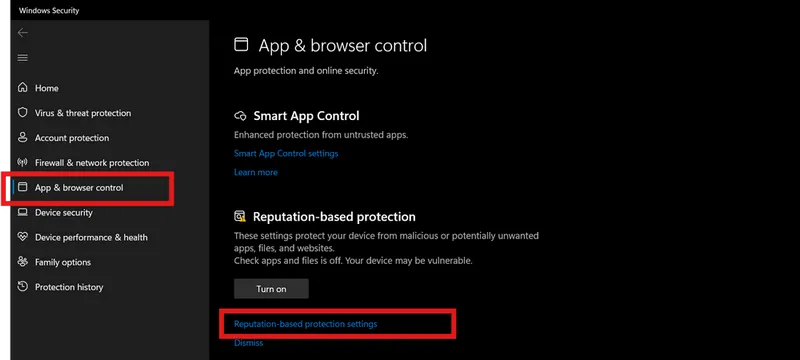
How to turn off Reputation-based Protection in Windows if it stops the cheat from launching?
  1. Start → type Reputation-based Protection.

turn off reputation base protection

  1. Disable all options.
Why does the cheat fail with a wrong system time and how to fix it?

Sync system time (Windows Settings → Time & Language → Sync).

Why is the ESP displayed incorrectly and how to fix it?

Set Windows scaling to 100% and the same resolution as in-game.

What to do if the loader does not work?

Try running it with a VPN.

Which Windows security features must be disabled for the cheat to work?

Disable Core Isolation and Secure Boot in BIOS.

What to do if the cheat does not inject or you have gameplay issues?

Switch the display mode to "Borderless" or "Windowed".

Is virtualization and Hyper-V required for the Predator cheat to work?

Yes, cheats require virtualization and Hyper-V to be enabled.

Video guide

Step-by-step video guide