ABI Koenflow Trade BOT Guide - Complete Installation and Setup Tutorial
Detailed installation and setup guide for ABI Koenflow Trade BOT on Arena Breakout (ABI)
Back to ABI Koenflow Trade BOT descriptionFrequently Asked Questions about ABI Koenflow Trade BOT
❓ How to launch ABI Koenflow Trade BOT?
Follow the guide below. The process usually includes downloading, installing and activating the cheat.
📥 How to download loader for ABI Koenflow Trade BOT?
Click the button on the right, pass captcha — and you'll be redirected to the Telegram bot with the link.
⚡ System Requirements
Step-by-Step Installation Guide for ABI Koenflow Trade BOT
Software Usage Guide
Step-by-step guide for downloading and launching our software:
Step 1: Preparation
After payment, you will receive:
- a key to activate access to the cheat,
- a link to this manual.
Prepare your PC:
-
Completely disable Windows Defender (real-time protection). Remove other antivirus programs if installed.
-
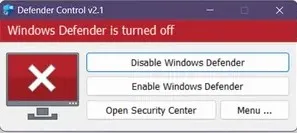
We recommend disabling Windows Defender using Defender Control, download here (password: sordum). It should be red, with a red cross.
-
Uninstall: Faceit AC, Riot Vanguard.
-
Enter the game without the cheat and set the screen mode to "Borderless" if you have 1920x1080 resolution or "Windowed" if you have high.
Step 2: Loader Installation & Key Activation
-
Download the loader from the "Frequently Asked Questions" section above by clicking the "Download loader" button.
-
The full instruction manual from the cheat developer is available at this link
Step 3: FAQ for Common Issues
- Windows Defender / Antivirus enabled → fully disable.
- Update Visual C++ libraries → Download.
- Update DirectX → Download.
- Remove FaceIt / Riot Vanguard anticheats.
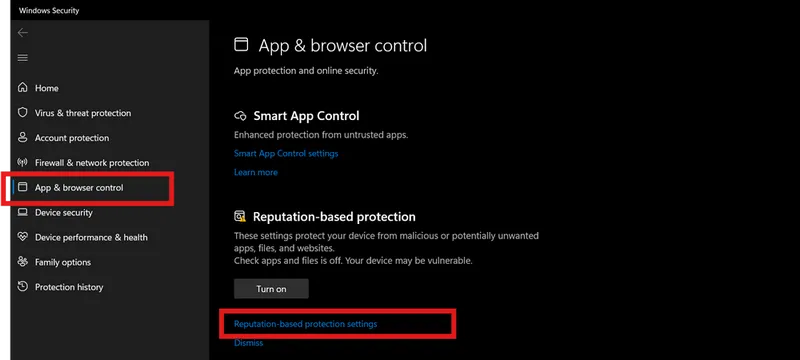
- Disable Reputation-based Protection:
- Start → type Reputation-based Protection.
-
Disable all options.
-
Sync system time (Windows Settings → Time & Language → Sync).
- ESP displays incorrectly → scaling 100% + same in-game resolution.
- Loader fails → try with VPN.
- Disable Core Isolation.
- Injection/gameplay issues → switch screen mode as described above (Borderless / Windowed).
📝 Additional Information
🔒 Security and Anonymity
Our product receives regular updates to ensure maximum security and compatibility with the latest game versions.
🆘 Technical Support
If you encounter any issues with installation or operation, contact our technical support.